

eSquirrel making textbooks playable

Shuffle mode

Shuffle Mode
Write your own digital content for your classes and shuffle questions for a more diverse content and lessons.

Share This Post

Write your own digital content for your classes in our authoring tool. Shuffle mode lets you shuffle through any questions in your course. They will be shuffled again after students open the question.

With the shuffle mode, you can have questions in your course shuffled at will. They will be shuffled after every time students open the quest.

Here’s how:
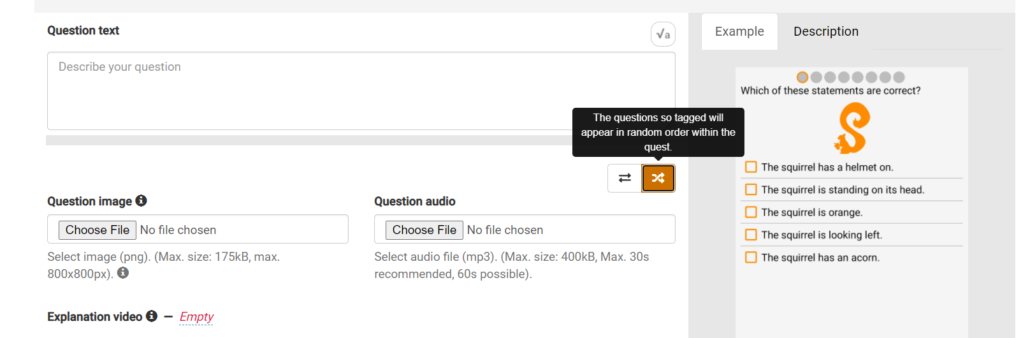
In the Authoring Tool, you create a new course and create chapters and quests as usual. When writing questions, you can click the “Shuffle button“.

All questions that are marked this way will appear in random order within the quest. In the teacher’s portal, you can also see which quests have shuffled questions and which do not.

The questions marked this way appear in random order within the quest:

The questions marked in this way appear in a fixed order within the quest:

Here are more tips on how to create your own courses.

Sie möchten über den Marktplatz Lernapps am Laufenden bleiben?

Registrieren Sie sich jetzt für unseren Newsletter!

Mehr zum Entdecken

Aus Schullizenz wird All-inclusive-Lizenz

Aus Schullizenz wird All-inclusive-Lizenz

Geänderter Name – gleiche Funktionalität. Erhalten Sie mit der All-inclusive-Lizenz von eSquirrel Zugang zu allen eSquirrel-Kursen.

Do You Want To Boost Your Business?

drop us a line and keep in touch